

On this page (7 sections)
AI is good at retro admin: grouping notes, drafting a summary, proposing actions to argue over. It's bad at the part that makes a retro worthwhile, which is a team deciding what matters and committing to change it. Used well, it gives you more time for that part.
The prompts below all do the same few things: they limit the model to your notes, make it quote what it used, and let it say "no evidence". Then comes the step most prompt lists skip: checking the answer, because it can read well and still be wrong.
What to give AI, and what to keep
Give it the admin
- Sorting 40 notes into themes
- A first draft of the sprint retrospective report
- Spotting topics that repeat across retros
- Candidate actions for the team to argue over
- Facilitator questions on a difficult theme
Keep it with people
- Deciding what matters. That's what voting and discussion are for.
- Reading the room. It doesn't know that the quiet person's note is the important one.
- Judging people or performance. Never ask a model who caused a problem.
- Accountability. An action only gets done because someone chose to own it.
The reason to be careful about over-reliance is more than a hunch. In a survey of 319 knowledge workers published at CHI 2025, researchers from Microsoft and Carnegie Mellon found that higher confidence in generative AI was associated with less critical thinking, and that AI shifts the work toward verifying and integrating its output. So the checking section below isn't optional. It's the job.
Before you paste anything
Retro notes are candid, and that's their value. They can also include customer names, security problems, and opinions about colleagues.
The anatomy of a prompt that works
Asking "summarize my retro" gets a smooth paragraph you can't check. Most of the improvement comes from five additions. Stefan Wolpers makes the general point for Scrum practitioners: give the model context, desired outcomes, data and constraints. The last three cards come from Anthropic's guidance on reducing made-up answers, and they apply to any model.
Context
Say what this is for
Who's the team, what's the sprint, and who reads the result.
Format
Fix the output's shape
Sections, length, order. It's easier to check, and easier to compare from one sprint to the next.
Limit
Only these notes
Tell it not to use outside knowledge, or add causes, numbers or feelings the notes don't state.
Quotes
Require a quote per claim
Word-for-word. If it can't find one, the claim has to go.
Way out
Let it say "no evidence"
Models tend to answer whatever you ask. Explicit permission to admit uncertainty cuts down on made-up answers.
The prompts
Copy these into any AI assistant and fill in the brackets. They're starting points, so adjust the numbers and the format to suit your team.
1. Group notes into themes
Use it before the meeting, or instead of grouping by hand on a big board.
You are helping a Scrum team prepare its sprint retrospective.
Below are the notes from our board, one per line, with their vote counts.

Group the notes into 3 to 6 themes. For each theme, give:
- a name of 3 words or fewer
- the total votes
- every note in the theme, copied word for word

Rules:
- Use only these notes. Don't add causes, numbers or feelings they don't state.
- Put any note that fits no theme under "Ungrouped". Never drop a note.
- If you aren't sure where a note belongs, say so.

Notes:
[paste notes, with votes]
"Never drop a note" matters most. One odd note can be the most important thing on the board, and summaries tend to smooth those away.
2. Write the sprint retrospective report
This is the prompt most people are looking for. Change the audience to change the tone: a report for the team can include more than one for a stakeholder.
Write a one-page sprint retrospective report for [the team / our manager].
Use only the material below.

Sections:
1. Top themes, in vote order. One sentence each, plus one quoted note.
2. What went well. Two bullets, each with a quoted note.
3. Action items. Copy them exactly as written, with owner and due date.
4. Last retro's actions: done, kept or dropped. Copy from the list below.

Rules:
- Don't name anyone except action owners.
- Don't add recommendations or actions of your own.
- If a section has no material, write "Nothing recorded".
- Leave out any note that could identify its author, or that the team might
  not want this reader to see. List those at the end under "For you to decide".
- At the end, list every sentence that isn't directly supported by a note.

Material:
[paste themes, notes, actions and last retro's actions]
3. Check the draft
Run this in a new chat, so the model isn't defending its own work. Then go through what it flags yourself.
Below are a set of retro notes and a draft report.

For each claim in the draft, quote the note that supports it, word for word.
If no note supports a claim, mark it UNSUPPORTED.
Then list every note with [2] or more votes that the draft doesn't mention.
Don't rewrite the draft.

Notes:
[paste notes]

Draft:
[paste draft]
We tried prompts 2 and 3 on a made-up board of nine notes, with one AI model. It's a small test, so take it as an illustration. Given a draft saying that staging "hurt team morale", that "scope changed mid-sprint three times" and that "the team recommends a staging on-call rota", the check marked all three as unsupported (the notes said three stories were added, not three changes), and listed three notes with two or more votes that the draft had missed.
The first version of the report prompt also passed a note reading "I don't feel I can raise problems in planning any more" into a draft for a manager. It broke no rule we'd given it. So we added the "For you to decide" rule above, and on a second run it held that note back.
4. Draft candidate actions
Use this in the meeting, on the themes the team voted for. These are candidates to argue over, not decisions.
Below are our top-voted themes, their notes, and the actions we already have.

Draft 3 candidate action items. For each, give:
- a sentence starting with a verb, small enough to finish in one sprint
- a "done when" sentence
- the notes it comes from

Rules:
- Leave the owner blank. The team will choose.
- Don't repeat an existing action.
- Avoid "be more careful" or "communicate better".
- If a theme needs someone outside the team, write the action as an
  escalation the team can own: who we ask, what we ask for, and by when.

Themes, notes and existing actions:
[paste]
The owner stays blank on purpose. Then rewrite the winner in your own words, and use the format from retrospective action items that actually get done.
5. Find what keeps coming back
The AI is useful here because people forget. Paste in your last few retros, as long as your policy allows it.
Below are the notes and actions from our last [4] retros, each with its date.

Which problems appear in 2 or more retros? For each, list:
- the dates, with one quoted note from each
- any action we took on it, and whether it was done

Only count it as the same problem if the notes describe the same thing,
not just similar words. If you're unsure, say so.

Retros:
[paste]
6. Prepare questions for a hard topic
Good for a theme with some heat in it. It pairs well with a blameless retrospective.
Our retro's top theme is [theme]. Here are the notes:
[paste]

Write 5 open questions for the facilitator. Each should start with "what"
or "how", and none may mention or imply that a person is at fault.
What to check before it goes anywhere
There's a good reason for all this checking. Here are the most relevant measurements we could find. Neither is about retro notes, so treat them as a reason to check, not as an estimate of how wrong your summary will be.
AI vs people, summarizing long documents
An Australian regulator's 2024 trial. Reviewers didn't know AI was involved. The model has since been superseded.
Source: ASIC and AWS trial, as reported by Language Log (September 2024)
Reviewers in that trial complained about missing nuance and emphasis, wrong information and a focus on side points, and some concluded that AI summaries could create more work because of the fact-checking. That report itself says the model has been superseded, and that better prompts improved results. But a larger study in 2025 still found problems in AI answers about the news:
3,000+ AI answers about the news, reviewed by journalists
45%
had at least one significant issue
31%
had serious sourcing problems
20%
had major accuracy issues, including made-up details
Even the vendors say so. Anthropic's guidance says its techniques reduce hallucinations but don't eliminate them, and that you should always validate critical information. So:
Six checks for a retro summary
-
1
Search for every quote
Find each one on the board. If a quote isn't there word for word, the claim doesn't stand.
-
2
Look for what's missing
Read the notes the draft leaves out, especially ones with votes and the odd ones out. Is the most uncomfortable note still there?
-
3
Check the numbers
Vote counts and totals, and any numbers at all. If a note didn't state a number, the report shouldn't either.
-
4
Watch for softening
"Staging was down all Wednesday and nobody owned it" shouldn't become "some environment challenges". Summaries smooth over conflict.
-
5
Watch for made-up causes
Notes say what happened. A summary that says why, when no note did, has made it up. The same goes for team feelings, like "morale is low".
-
6
Read it as the person in the note
Could someone identify a colleague from this? Would they feel it's fair? If it's going to a manager, that matters more.
If you're short on time, do the first two checks. Those catch the failures that matter most: claims nobody made, and problems that quietly disappeared.
AI built into your retro tool
Pasting notes into a chat works for occasional use. For a routine, it's extra steps, and those are what get skipped. Retro tools have started building this in, and the same checks apply: can a person overrule it, and can you trace its output back to the notes?
In Retro Rabbit, we built CarrotIQ so that a person decides at each step.
- Suggested groups. CarrotIQ spots related notes and suggests a group in the column, with a short name and the notes it would pull together. You accept it or dismiss it.
- Summaries. A short summary of each column plus the whole retro. It's there to be read and checked, so treat it as a draft like any other.
- Suggested actions. Ask for one in the Actions lane and it drafts one from your notes, weighted by votes, skipping actions you've already made. The team picks the owner.
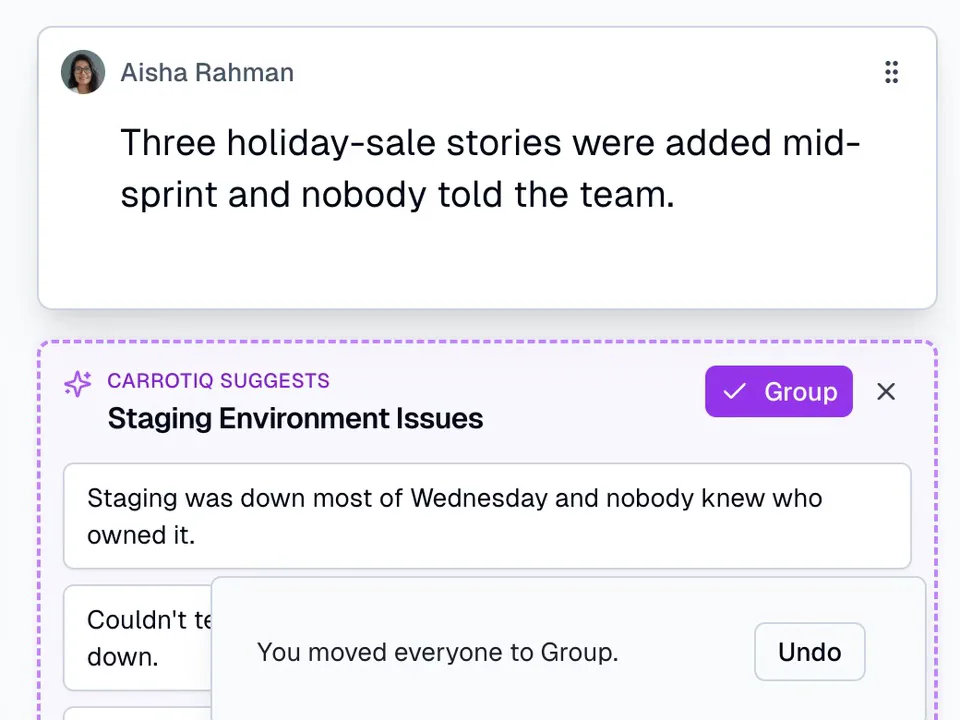
CarrotIQ runs on OpenAI's models through its API, which OpenAI says it doesn't use to train its models by default. It's on Pro AI and Enterprise, and included in the 14-day trial, with no card needed. Try the 2-minute practice retro to see it on a sample team, or see pricing.
Related
Frequently asked questions
Can ChatGPT write a sprint retrospective report?
It can write a good first draft, if you give it the notes and tell it to use only those. Ask it to quote a note for each theme, to say when it has no evidence, and to list anything it couldn't support. Then check the draft against the notes before you share it.
Is it safe to paste retro notes into ChatGPT?
Check your company's policy first, and remove names. OpenAI says it may use content from its services for individuals (Free, Plus and Pro) to train its models unless you opt out, and that by default it doesn't use inputs from ChatGPT Business, Enterprise, Edu or the API. Other tools have their own terms.
What should you not use AI for in a retrospective?
Deciding what matters, reading the room, and assigning owners. Voting and discussion decide what matters. AI can't tell that the quiet person's note is the important one, and an action only gets done because a person chose to own it.
How do you stop AI inventing things in a retro summary?
You can reduce it, but not eliminate it. Limit the model to the notes you supply, require a word-for-word quote for each claim, tell it that 'no evidence' is an acceptable answer, and then run a separate check for unsupported claims. Read the result yourself.
What does Retro Rabbit's AI do?
CarrotIQ suggests groups for related notes (a person accepts or dismisses each one), writes a summary of each column and the whole retro, and drafts an action item from the notes, weighted by votes and skipping actions you already have. It's on Pro AI and Enterprise, and included in the 14-day trial.
Run retros that actually lead to change
Your team adds notes during the sprint, CarrotIQ groups and summarizes them and suggests action items, and unfinished items carry into the next retro.
14-day free trial · No credit card