

On this page (17 sections)
- What is a sprint retrospective?
- Who should attend
- How long and how often
- The five stages of a retrospective
- How to run a sprint retrospective, step by step
- Live, async or hybrid?
- Retrospective templates
- Questions to ask
- Setting the stage and icebreakers
- Action items: closing the loop
- Facilitating a retrospective
- Common retrospective anti-patterns
- How to tell if your retros are working
- Where AI helps (and where it doesn't)
- Choosing a retrospective tool
- Try it in Retro Rabbit
- Related reading
A sprint retrospective is the meeting at the end of every sprint where the team looks at how it worked and decides what to change next time. Done well, it's the reason a team gets better over time instead of just getting older. Done badly, it's an hour of complaints that nobody acts on.
This guide covers everything you need to run good ones: what the Scrum Guide actually says, who should be there, how long it should take, a stage-by-stage agenda, when to go live or async, which template to use, how to make action items stick, and how to tell whether your retros are working.
What is a sprint retrospective?
The Scrum Guide (2020) defines the event in one line:
The purpose of the Sprint Retrospective is to plan ways to increase quality and effectiveness.
The team inspects how the last sprint went in terms of individuals, interactions, processes, tools and its Definition of Done. It identifies what went well, what problems came up, and how they were (or weren't) solved. The most impactful improvements should be acted on quickly, and the Guide says they can even be added to the next sprint's backlog.
Three details from the Guide are often misquoted:
- The retrospective concludes the sprint. It's the last event of the sprint, after the sprint review. It isn't part of sprint planning.
- The timebox is a maximum of three hours for a one-month sprint. Shorter sprints usually need less. The Guide gives no formula beyond that.
- The output is improvements, not a document. A retro that produces a long page of notes and no change has missed the point.
The idea is older than Scrum. One of the principles behind the Agile Manifesto is that at regular intervals the team reflects on how to become more effective, then adjusts its behavior. Retros are how most teams put that into practice: in Digital.ai's 15th State of Agile report (2021, a vendor survey), 83% of respondents said their teams use retrospectives.
Retrospective vs sprint review vs postmortem
Looks at the product
Sprint review
Who: the Scrum Team and stakeholders. When: end of the sprint. Output: feedback and backlog changes.
Looks at the team and how it works
Sprint retrospective
Who: the Scrum Team. When: after the review, as the last event of the sprint. Output: one to three improvements.
Looks at one incident or failure
Postmortem / incident review
Who: whoever was involved. When: after an incident. Output: root cause and fixes.
If something went badly wrong during the sprint, run a proper incident review for it. Don't try to squeeze a root-cause analysis into the retro.
Who should attend
The whole Scrum Team: developers, the Product Owner and the Scrum Master. Product Owners sometimes skip the retro, and that's a mistake. Many of the problems that come up (unclear requirements, late scope changes) need them in the room.
Managers and stakeholders usually stay out. People don't speak openly in front of someone who writes their performance review. If a manager wants to know what came up, share the summary and the action items afterwards. Invite them only if the team asks.
For teams larger than about ten people, the conversation gets thin: most people never speak. Split into sub-teams for the discussion and bring the top themes back together, or run the writing and voting async so everyone contributes even if they don't talk.
How long and how often
Hold a retro at the end of every sprint. Skipping "just this once" is how teams end up with no retros at all.
How long a retro takes, by sprint length
The scale ends at the Scrum Guide's maximum of three hours for a one-month sprint.
The biggest time cost in most retros is people writing notes in silence while trying to remember what happened two weeks ago. Moving that writing into the sprint is the easiest way to get a shorter meeting with better material in it. See the biggest problem agile teams have with retrospectives.
The five stages of a retrospective
Esther Derby and Diana Larsen's book Agile Retrospectives (first edition 2006; second edition 2024, with David Horowitz) describes five stages that almost every good retro follows. We add one step before them: a short review of last retro's action items.
-
1
Review last retro's action items
Five minutes: done, in progress, blocked, or drop. If this isn't on the agenda, follow-through quietly dies.
-
2
Set the stage
Remind everyone why you're here, and set the tone with a quick check-in or icebreaker. Many teams read Norm Kerth's Retrospective Prime Directive: whatever we discover, we believe everyone did the best job they could with what they knew and had at the time.
-
3
Gather data
Everyone adds notes about what happened, using your chosen template's columns.
-
4
Generate insights
Group related notes, vote, and discuss the top groups. Ask why things happened, not just what happened.
-
5
Decide what to do
Agree on one to three action items, each with an owner.
-
6
Close
A quick round on how the retro went, and thank people.
Sample agendas
30 minutes (notes added during the sprint):
| Time | Stage |
|---|---|
| 0–3 min | Review last retro's action items |
| 3–5 min | Set the stage |
| 5–10 min | Add missing notes, group, vote |
| 10–25 min | Discuss the top two or three groups |
| 25–30 min | Decide actions and close |
60 minutes (classic live retro):
| Time | Stage |
|---|---|
| 0–5 min | Review last retro's action items |
| 5–10 min | Set the stage: check-in or icebreaker |
| 10–22 min | Gather data: silent writing |
| 22–30 min | Group and vote |
| 30–50 min | Generate insights: discuss the top groups |
| 50–57 min | Decide what to do |
| 57–60 min | Close |
90 minutes (end of a release or quarter): use the 60-minute agenda, but spend 20 minutes on gathering data (a timeline of the period works well) and 35 minutes on insights. Use a reflective format such as 4Ls or Sailboat.
How to run a sprint retrospective, step by step
Before the retro
-
Day 1 of the sprint
Open the board
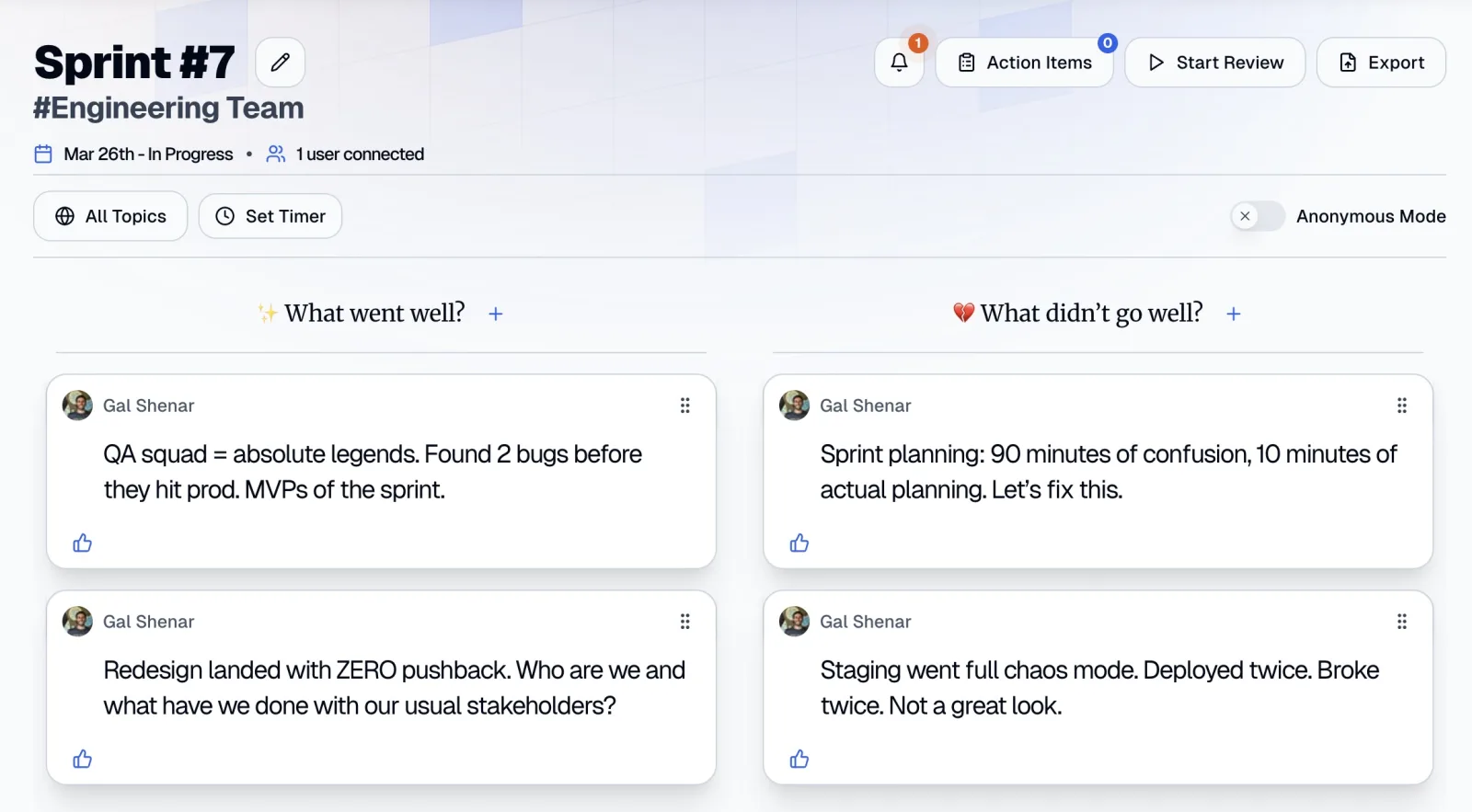
The best notes are written when things happen. In Retro Rabbit, clicking Start New Retro after your last meeting opens the next board straight away, so it's ready the next morning.
-
During the sprint
Ask for notes
Mention it at standup a couple of times. People can add notes on the board, in the Team Room's Quick Notes box, or with
/retro your notein Slack if your team uses it. -
Near the end
Pick the format
Choose based on what happened this sprint (see the template section below). The default works most of the time.
-
Two days before
Fill gaps and vote
Ask everyone to fill gaps and vote, so the meeting can start at discussion.
During the retro
- Review last retro's actions first. Open the previous action items and go through them in five minutes.
- Set the stage. Keep it short. A one-word check-in ("one word for this sprint") is enough.
- Add what's missing. Give a few minutes of silent writing for anything people didn't add during the sprint. Use a shared timer.
- Group and vote. Drag related notes together. Dot voting with three votes each works for most teams.
- Discuss from the top. Sort by votes and take the top groups one at a time. Give each about five minutes. Ask "what happened?", then "why?", then "what would change it?".
- Write actions as you go. Don't leave them for the last two minutes. Each one needs an owner.
- Close. Ask "was this retro worth the time?" on a scale of 1 to 5. If the average drops, change something.
After the retro
- Share a summary with anyone who needs it: one paragraph and the action items. CarrotIQ's Sprint Summary gives you a draft per column plus an overall summary.
- Put the actions where work happens. The Scrum Guide's suggestion is the best one: add the most important improvement to the next sprint's backlog, so it competes for time like any other work.
- Check progress mid-sprint, at standup, in one sentence.
- Start the next retro with them. In Retro Rabbit, the Action Items panel has Previous Retro and Old / Unresolved Items tabs, so last sprint's commitments are on screen when the next retro starts.
Live, async or hybrid?
You don't have to choose between "everyone in a room for an hour" and "a form nobody fills in". There are three real options.
45–60 min meeting
Fully live
How: write, group, vote and discuss in one meeting. Best for: co-located teams, hard conversations, new teams. Watch out for: recency bias; loud voices dominate.
20–30 min call
Hybrid
How: notes and votes during the sprint, then a short call. Best for: most teams, most sprints. Watch out for: the call turning into a re-read of the board.
No meeting
Fully async
How: notes, votes and decisions all in writing. Best for: teams across 3 or more time zones, routine sprints. Watch out for: low participation; conflict handled badly in writing.
Our recommendation for most teams is hybrid: notes during the sprint, then a 20 to 30-minute call that starts at the discussion. Go fully live for a hard sprint or a conflict; feelings are easier to handle face to face. Go fully async when there's no time of day the whole team is awake. The details are in how to run an async retrospective.
Retrospective templates
A template is a set of columns that gives the reflection a shape. Each of these has a full guide with live and async run sheets, prompts and example action items:
- What Went Well: What went well? / What didn't go well? / What did we learn? / What puzzles us? The best default, based on Norm Kerth's four key questions.
- Start Stop Continue: goes straight to behavior changes. Fast, but it skips understanding.
- Sailboat: winds, anchors, rocks and an island. Adds goals and risks.
- Mad Sad Glad: for hard sprints and big changes, when feelings need airing.
- 4Ls: Liked, Learned, Lacked, Longed For. Balanced and reflective, good after a release.
Pick based on the sprint you just had, not on what you used last time. Keep one default and rotate when the notes start repeating, usually every three to five sprints. The template library has a chooser table and column prompts for formats such as Starfish and KALM, which you can type into custom columns.
Questions to ask
Columns get people writing; questions get them to say what they actually think. A few that work in almost any retro:
- What would we do again next sprint, exactly the same way?
- Where did work sit waiting?
- What did we learn that the rest of the company should know?
- What's the one thing that, if we fixed it, would make next sprint noticeably easier?
- Did last retro's actions make a difference? How can we tell?
Pick three to five per retro, not twenty. 60 sprint retrospective questions has sets for specific situations: a missed sprint goal, after an incident, a new team, and "the same issue keeps coming back".
Setting the stage and icebreakers
The first five minutes decide whether people talk for the next fifty. A good opener is short, connects to the sprint, and gives everyone a chance to say something: "energy level from 1 to 10, and what would make it a 10?" works better than "what's your favorite pizza?". See retrospective icebreakers for remote teams for about 25 that don't make engineers cringe.
Action items: closing the loop
This is where most retros fail. Vendor data varies widely in how it measures completion, but the pattern is consistent:
- In Easy Agile's 2026 State of Team Alignment survey (419 people, from a tool vendor), 69% of teams said they implement less than 60% of retro actions before the next retro. 28.9% of actions needed changes outside the team's control.
- TeamRetro's 2026 Follow-Through Index (its own product data) found that about 90% of actions with an owner and a due date were completed, against about 67% of actions with neither. Retros that ended with one to three actions completed about 79% of them; those with ten or more completed about 56%.
The rules that follow from that:
- One to three actions per retro. Esther Derby makes the same point in Eight Reasons Retrospectives Fail: pick one or two.
- Every action gets an owner, a verb, a "done when" and a check date. "Improve code review" is a wish. "Each person reviews one PR before starting new work each morning; Aisha reports average review time at the next retro" is an action.
- Put the work in the sprint backlog. Improvement work kept in a separate list loses to "real" work every time.
- Review them first at the next retro. The five-minute review at the start is what turns a retro into a loop.
- Escalate what the team can't fix. For actions that need another team or a manager, the action is "Marcus takes it to the platform team's planning on Tuesday", not "platform should fix staging".
The full playbook, with good-vs-vague examples and a status vocabulary for carried-over items, is in retrospective action items that actually get done.
Facilitating a retrospective
The facilitator (often the Scrum Master, but it can rotate) runs the process so the team can focus on the content. Their main jobs:
- Make it safe to be honest. Read or paraphrase the Prime Directive. Ask for notes about situations, not people. Let people post without their names. In Retro Rabbit, the Show Name switch does this.
- Balance voices. Silent writing before discussion stops the loudest person from setting the agenda. In discussion, ask quiet people directly but gently: "Jun, you added a note on this. Anything to add?"
- Protect the timebox. A shared timer is the least awkward way to move on.
- Hold back solutions until the problem is understood. The first fix proposed is rarely the best one.
- Stay neutral. If the facilitator has strong opinions about a topic, someone else should facilitate that part.
Common retrospective anti-patterns
| Anti-pattern | What it looks like | Fix |
|---|---|---|
| The groundhog retro | The same issues every sprint, with no change | Review last actions first; escalate what the team can't fix |
| The complaint session | Only problems, never wins | Read the wins first; timebox the problem columns |
| The memory test | Twenty minutes of "what happened again?" | Add notes during the sprint |
| The loudest voice | Two people talk, six listen | Silent writing, voting, posting without names |
| The action-item graveyard | Ten actions, none done | One to three actions, each with an owner and a date |
| The skipped retro | "We're too busy this sprint" | Shorten it rather than skip it |
| The manager's meeting | People perform for whoever is senior | Keep managers out, or share the summary instead |
The Agile Alliance's glossary entry on retrospectives warns that when the same issues keep coming back without improvement, the retro may have become an empty ritual. That's the moment to change something about how you run it. More in how bad retrospectives can sink a team.
How to tell if your retros are working
Most teams never check. Five simple measures:
- Action completion rate: of the actions agreed last retro, how many were done by this one? Track it for three sprints and you'll know whether follow-through is a problem.
- Recurring themes: how many of this retro's top groups also appeared in the last two? A few repeats are normal. The same top issue three times in a row means the actions aren't working.
- Stale actions: how many open actions are older than two sprints? Re-scope them or drop them, and say so out loud.
- Participation: what share of the team added at least one note? Below about two-thirds, find out why.
- Worth the time: a 1-to-5 rating at the end of each retro. Watch the trend, not the number.
Retro Rabbit's Team Room page shows Completed Retros, Notes Added and Open Action Items, plus a chart of notes over time, which covers some of this without a spreadsheet.
Where AI helps (and where it doesn't)
AI is good at retro admin. It isn't good at the human parts.
Where it helps
- Naming groups of related notes, so a 40-note board is readable at a glance.
- Summarizing each column and the whole retro, for stakeholders and for your own records.
- Drafting an action item from the most-voted notes, as a starting point.
Where it doesn't
- Deciding what matters. That's what voting and discussion are for.
- Reading the room. AI doesn't know that the quiet person's note is the important one.
- Accountability. An action item only gets done because a person owns it.
In Retro Rabbit, CarrotIQ does all three jobs AI is good at: it names groups as you drag notes together, writes a Sprint Summary per column plus an overall summary, and offers CarrotIQ Suggest when you create an action item (weighting the most-voted notes and avoiding duplicates). It's on the Pro AI plan and included in the free trial.
Choosing a retrospective tool
A whiteboard and sticky notes still work for a co-located team. For remote, hybrid or async teams, look for:
- Notes any time, not just during the meeting, so people can write when things happen
- An option to post without your name, for the things people won't say out loud
- Voting and sorting, so the discussion starts with what matters most
- Action items that carry into the next retro, not just a list at the bottom of a board
- Summaries and export, so the outcome travels beyond the meeting
- Pricing that fits your team: per team or per user makes a big difference at scale
If you're comparing tools, our side-by-side pages cover Retrium, Parabol and EasyRetro.
Retro Rabbit started in 2019 to fix the problem we kept hitting ourselves: by retro day, nobody remembered the first week of the sprint. Why we built Retro Rabbit tells that story.
Try it in Retro Rabbit
Start a 14-day free trial with no card required, pick a template, and ask your team to add their first note today, so your first retro already has material in it. CarrotIQ is included in the trial, and pricing is per team, not per user: see pricing.
Related reading
- Sprint retrospective templates
- What Went Well retrospective
- Start Stop Continue retrospective
- Sailboat retrospective
- Mad Sad Glad retrospective
- 4Ls retrospective
- 60 sprint retrospective questions that get honest answers
- Retrospective action items that actually get done
- How to run an async retrospective
- Retrospective icebreakers for remote teams
- The biggest problem agile teams have with retrospectives
- How bad retrospectives can sink a team
- Why we built Retro Rabbit
Frequently asked questions
What is the purpose of a sprint retrospective?
The Scrum Guide says the purpose is to plan ways to increase quality and effectiveness. In practice, the team looks at how the last sprint went (people, process, tools and its Definition of Done) and agrees on a small number of improvements to make in the next sprint.
How long should a sprint retrospective be?
The Scrum Guide caps it at three hours for a one-month sprint and says shorter sprints usually need less. Most teams with two-week sprints spend 45 to 60 minutes. If notes are added during the sprint, 30 minutes is often enough.
Who should attend a sprint retrospective?
The whole Scrum Team: the developers, the Product Owner and the Scrum Master. Managers and stakeholders usually stay out, because people speak less openly in front of them. Invite them only if the team agrees.
What's the difference between a sprint review and a sprint retrospective?
The sprint review looks at the product: what was built, with stakeholders, and what to do next. The retrospective looks at the team: how it worked, and what to change. The review comes first; the retrospective concludes the sprint.
What are the five stages of a retrospective?
Set the stage, gather data, generate insights, decide what to do, and close the retrospective. The structure comes from Esther Derby and Diana Larsen's book Agile Retrospectives. Many teams add a short review of the previous retro's action items at the start.
Can a sprint retrospective be done asynchronously?
Yes. The team adds notes during the sprint, groups and votes on them before the retro, and either holds a short call to discuss the top items or agrees on action items in writing. Async works especially well for distributed teams across time zones.
Run retros that actually lead to change
Your team adds notes during the sprint, CarrotIQ groups and summarizes them and suggests action items, and unfinished items carry into the next retro.
14-day free trial · No credit card