

On this page (10 sections)
A sprint retrospective agenda has six parts: last retro's action items, set the stage, gather data, generate insights, decide what to do, and close. Below are the same six parts cut to fit 30, 60 and 90 minutes, with every minute allocated. Take the one that fits, copy the invite, and keep whichever parts your team needs.
The shortest one only works under one condition, so read that part before you book it.
How long should a retro be?
The Scrum Guide gives a maximum and little else: the Sprint Retrospective is timeboxed to three hours for a one-month sprint, and is usually shorter for shorter sprints. Everything else is someone's judgment, and judgments vary.
A two-week sprint: how long sources say a retro should take
These are recommendations, not measurements. Most of the sources sell retro tools or software.
Source: Each source's published guidance, linked in its label (checked November 2026)
So 60 to 90 minutes is a fair default for a two-week sprint, and it's what we'd book unless the notes are already written. We go into the reasoning in the sprint retrospective guide. A rough rule for choosing:
30 minutes
Notes are already on the board
One-week sprints, or two-week sprints where people added notes as things happened. Formats like Plus / Delta or KPT.
60 minutes
The standard retro
A two-week sprint with notes written in the meeting. Formats like What Went Well, Start Stop Continue or Sailboat.
The agendas, side by side
The same stages, scaled. Discussion gets the most time in all three.
Where the minutes go
Start and end minute of each stage. The 90-minute agenda has a 5-minute break at minute 38.
The 30-minute sprint retrospective agenda
Use it when notes and votes are already on the board. Ask for votes the day before.
| Time | Stage | What happens |
|---|---|---|
| 0–3 min | Last retro's actions | Each owner says done, still going or drop |
| 3–5 min | Set the stage | One word for this sprint, around the group |
| 5–10 min | Gather data | Add anything missing, group what's left, and do last votes |
| 10–25 min | Generate insights | Discuss the top two groups: what happened, why, what would change it |
| 25–29 min | Decide | One action, maybe two, with an owner |
| 29–30 min | Close | Thank people, and confirm when the next board opens |
The 60-minute sprint retrospective agenda
The standard for a two-week sprint, and no pre-work is needed.
| Time | Stage | What happens |
|---|---|---|
| 0–5 min | Last retro's actions | Each owner gives a status. If nothing got done, that's the first topic |
| 5–10 min | Set the stage | Goal, ground rules, a check-in such as energy from 1 to 10 |
| 10–22 min | Gather data | Silent writing against a shared timer |
| 22–30 min | Group and vote | Drag related notes together, then three votes each |
| 30–50 min | Generate insights | Discuss the top groups, about five minutes each. Ask why, not just what |
| 50–57 min | Decide | One to three actions, each with an owner and a date |
| 57–60 min | Close | Rate the retro from 1 to 5, and say thanks |
For comparison, Atlassian's 60-minute play splits it 5, 15, 20, 15 and 5: tone, feedback, insights, actions, conclusion. It's similar, but its listed steps don't include a review of last retro's actions. We think that's worth the five minutes.
The 90-minute sprint retrospective agenda
For a month-long sprint, a release, a rough stretch or a new team. Use the extra time for depth, not more topics.
| Time | Stage | What happens |
|---|---|---|
| 0–5 min | Last retro's actions | Each owner gives a status |
| 5–10 min | Set the stage | Goal and ground rules. After a hard sprint, skip the playful check-in |
| 10–30 min | Gather data | A timeline of the period, then silent writing in the format's columns |
| 30–38 min | Group and vote | Group related notes, then vote |
| 38–43 min | Break | Five minutes, and a natural point to sense-check the top groups |
| 43–75 min | Generate insights | Discuss the top three or four groups. Look for causes and patterns |
| 75–86 min | Decide | One to three actions. Escalate what the team can't fix alone |
| 86–90 min | Close | What went well in this retro, and what to change next time |
If you're closing a whole project rather than a sprint, this isn't enough time. Use the project retrospective format instead.
Copy-paste agenda for the invite
Paste this into your calendar invite. Share it with the invitation: it's one of the simple meeting habits Aino Corry recommends, and it tells people what you need from them.
Sprint [N] retrospective (60 minutes)

Before the meeting: add any notes you haven't yet.

 0  Last retro's actions: done, still going or drop
 5  Check-in and ground rules
10  Write notes
22  Group and vote
30  Discuss the top topics
50  Decide 1 to 3 actions, each with an owner
57  Close: was this worth the time, 1 to 5?

We review the sprint, not the people in it.
The last line is a short form of the Prime Directive. Change it to whatever sounds like your team. For how to hold that line when a retro gets tense, see blameless retrospectives.
How to stay on time
Most retros overrun in the same two places: writing goes long, and the first topic eats the rest.
Keeping a retro on schedule
-
1
Show the timer
A shared timer is the least awkward way to move on. Nobody has to interrupt anyone.
-
2
Timebox each topic
Agree five minutes per group. At zero, ask: are we close to an action, or do we need to come back to this?
-
3
Write actions as you go
Capture them as soon as someone suggests one, rather than leaving it to the last two minutes.
-
4
Move the rest to the next retro
Unfinished topics are fine. If they matter, they'll get votes again next time.
Which parts can you skip?
| Part | Can you skip it? | Why |
|---|---|---|
| Last retro's actions | No | Without it, follow-through quietly dies, and you can't tell whether the last retro did anything |
| Set the stage | Shorten it | Two minutes is enough. After a hard sprint, drop the playful icebreaker but keep the ground rules |
| Gather data | Yes, if notes are in | This is where adding notes during the sprint saves the most time |
| Group and vote | Shorten it | Vote the day before and use the meeting for discussion |
| Discuss | No | This is the meeting. It's why you got people together |
| Decide | No | Skipping it is the most common way a retro turns into a complaint session |
| Close | Shorten it | One minute of thanks and a 1-to-5 rating will do |
Corry describes a related trap in her "Wheel of Fortune" antipattern: a team short on time jumps from listing problems straight to deciding, skipping the discussion of why they happened. The decision that comes out is usually a guess.
Running these agendas in Retro Rabbit
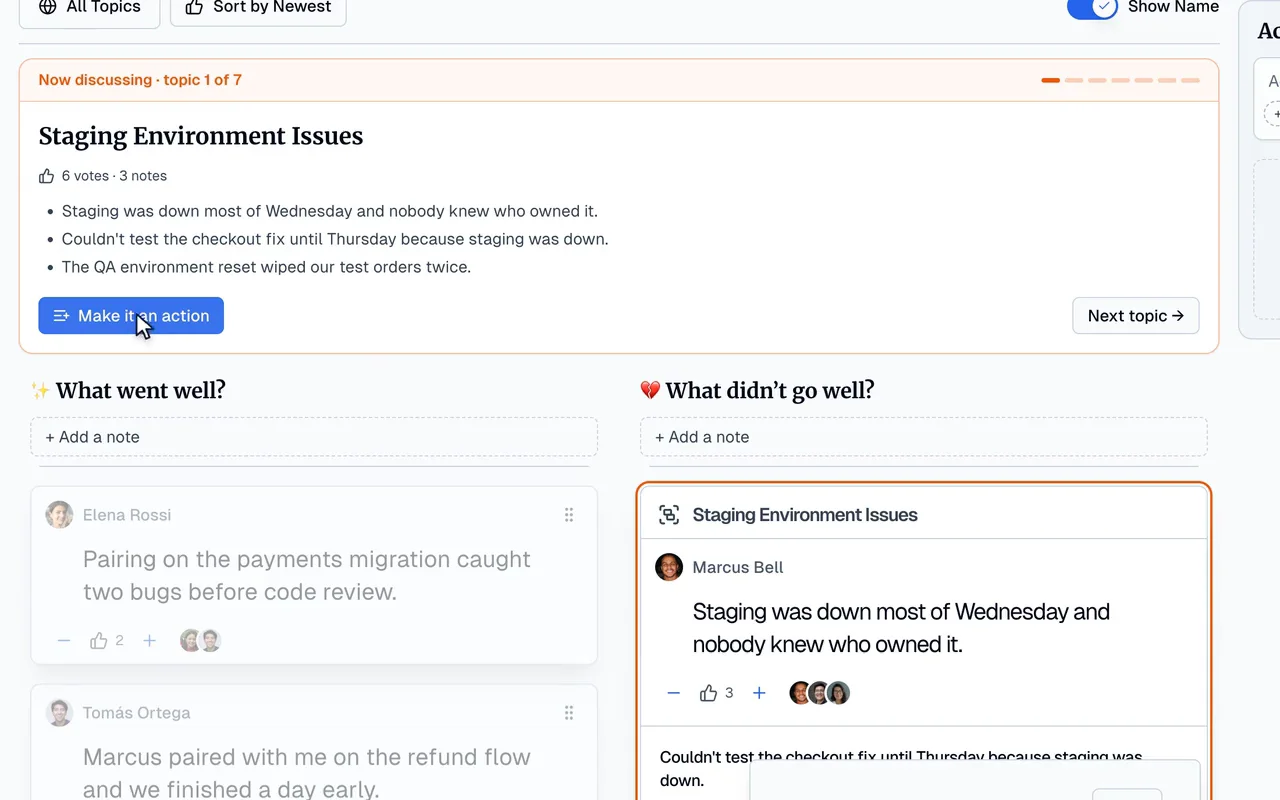
Retro Rabbit's guided retro follows this same structure, so nobody has to watch the clock and steer at the same time.
- Notes during the sprint are what make the 30-minute agenda possible. The board is open from day one.
- Look back opens the retro with a check-in on last retro's actions: Done, Keep or Drop.
- Write, Group, Vote and Discuss move everyone's screen together, and the facilitator can start the shared timer from the step bar. In Discuss, topics come up in vote order, and one click turns a topic into an action.
- CarrotIQ suggests groups for related notes, so grouping takes less of your meeting. It's on Pro AI and in the trial.
- Wrap up shows what the retro produced, flags actions with no owner, and collects a rating.
Try the flow in the 2-minute practice retro, with no signup. To use it on your own sprint, the trial is 14 days with no card. See pricing.
Related
Frequently asked questions
What should a sprint retrospective agenda include?
A review of last retro's action items, then the five stages from Derby and Larsen's Agile Retrospectives: set the stage, gather data, generate insights, decide what to do, and close. Time goes to generating insights, and the last part is deciding one to three actions with owners.
How long should a sprint retrospective be?
The Scrum Guide caps it at three hours for a one-month sprint and says shorter sprints usually need less, without giving a number. Most sources suggest 60 to 90 minutes for a two-week sprint. If the team adds notes during the sprint, 30 minutes can be enough.
Can you run a sprint retrospective in 30 minutes?
Yes, if the notes and votes are already on the board. A 30-minute agenda has no time for writing from scratch. Without notes added during the sprint, you'll spend most of it remembering what happened.
What comes first in a sprint retrospective?
Last retro's action items. Five minutes on what got done, what's still going and what to drop, before anyone writes a new note. If follow-up isn't on the agenda, it tends not to happen.
What do you cut when a retrospective runs over?
Discuss fewer topics. Don't cut deciding actions or closing. Two topics that end in a decision beat four that end when time runs out. Move the rest to the next retro; if they matter, they'll come back.
Should you add a break to a retrospective?
For 90 minutes or more, yes. Five minutes in the middle, between voting and discussion, gives people a natural stopping point. Intel's project retrospective program found energy on calls dropped noticeably after two hours.
Run retros that actually lead to change
Your team adds notes during the sprint, CarrotIQ groups and summarizes them and suggests action items, and unfinished items carry into the next retro.
14-day free trial · No credit card