

On this page (10 sections)
A project retrospective is a facilitated review, held within a few weeks of a project ending, where everyone involved looks at what happened and what to do differently next time. It differs from a sprint retro in one big way: there's no next sprint. If the lessons don't reach the next project, the meeting was only a pleasant goodbye.
Below: when to hold it, how to prepare when memories have faded, a two-session agenda based on Intel's program, which template to use, and how to make the lessons last.
Project retrospective vs sprint retrospective
The word "retrospective" in this sense goes back to Norm Kerth's 2001 book, Project Retrospectives. The Agile Alliance's history places the short, regular sprint version later, with Derby and Larsen's 2006 book closing out how it's practiced. As Aino Corry notes, the older post-mortem was typically held after something had gone wrong, whereas teams hold retrospectives even when things go well.
| Sprint retrospective | Project retrospective | |
|---|---|---|
| Covers | One to four weeks | Months or years |
| Who | The Scrum Team | Everyone with a view: the team, the people who've moved on, partner teams |
| Memory | Fairly fresh | Faded, so you have to rebuild it |
| Length | 30 to 90 minutes | Up to two 2-hour sessions |
| Feeds into | The next sprint, same team | The next project, often a different team |
That last row drives everything below. For the sprint version, see the sprint retrospective guide.
What a long-running program learned
Published data on project retrospectives is scarce. The most useful case study we found is Debra Lavell's 2010 PMI paper on Intel's program, which covers about eight years. It's one company's experience, written by someone who helped run the program, so treat it as practical guidance rather than proof.
Intel's project retrospectives, 2002 to 2010
~500
retrospectives run across project and platform teams
11% → 70%+
pre-work survey response rate, after cutting 78 questions to 5 and allowing two weeks instead of three days
2 × 2 hours
replaced one four-hour session, because energy on a call dropped after two hours
Source: Lavell, Raising the bar at Intel: a project retrospectives case study, PMI Global Congress 2010
The old post-mortems it replaced will sound familiar: run ad hoc, sometimes months after the project ended, facilitated by the project manager, producing lists of issues with no action plans and nowhere to find them later. The steps below address each of those.
When to hold it
At the end: within two to six weeks. That's the window Intel used. Sooner, and people are still catching up or celebrating. Later, and they've moved on and forgotten.
During the project: at milestones. On anything longer than a few months, don't wait. In the paper's breakdown of about 80 retrospectives, 54% came at the end of a project, about 32% during development and 14% during planning. It gives two reasons for going earlier: teams can still use what they learn, and the project managers of later projects can sit in and learn from the ones ahead of them.
Kerth's own rule of thumb, as Lavell reports it, is to spend 2% of total project time, which typically came to three days. Few teams will give you that today. Most of the value comes from doing the steps below well, whatever length you can get.
How to prepare: rebuild the memory
The biggest difference from a sprint retro is the preparation. Don't start the meeting by asking people what they remember.
Before the session
-
1
Pick a neutral facilitator
Someone who didn't run the project. Intel found project managers facilitating their own sessions couldn't share their own perspective, so a peer from another team frees them to take part.
-
2
Decide who to invite
Everyone with a view, including people who've moved to other work. Control the list yourself: Intel's first survey invited people to forward it, and about 60 recipients became more than 260.
-
3
Send a short survey, two weeks ahead
Five open questions at most, sent by the project lead with a clear reason. Allow two weeks and send reminders. Report answers without names.
-
4
Draw up the timeline
Dates of milestones, big decisions, people joining and leaving, launches and incidents. Pull it from the tracker, release notes and calendar, then let the team correct it.
The five survey questions
These are adapted from Intel's survey, which in turn builds on Kerth's four questions:
- From your point of view, what worked well?
- What did you learn?
- What should we do differently next time?
- What still puzzles you?
- What needs a deeper discussion or a follow-up?
Add a project-specific question only if you need to. Intel's first survey had 78 questions and an 11% response rate.
The agenda
For a big project, split it across two sessions a few days apart. This is Intel's format from Appendix C of the paper, which they arrived at because people ran out of energy on long calls and had nothing left for action planning.
The whole retrospective, from survey to follow-up
The timing follows Intel's program, adapted from Lavell (2010).
-
2 weeks before
Send the survey
Five open questions, with reminders.
-
The week before
Draft the timeline
Milestones, decisions, people, incidents.
-
Session 1
What did we learn?
Two hours on the survey and timeline.
-
Session 2
What will we change?
Two hours writing action plans, a few days later.
-
After
Share and follow up
Report plans within weeks, and check in each quarter.
Session 1: what did we learn? (2 hours)
| Time | What | You leave with |
|---|---|---|
| 10 min | Introductions, purpose, ground rules | Everyone knows why they're here |
| 10 min | Quick overview: scope, value, timeline | A shared starting point |
| 60 min | Review the survey and the timeline | Key messages |
| 30 min | Prioritize | Top things to keep and to change |
| 10 min | Wrap up | Who writes which plan next time |
Session 2: what will we change? (2 hours)
| Time | What | You leave with |
|---|---|---|
| 20 min | Recap session 1 | Same purpose, same list |
| 90 min | Write action plans | Plans someone will really carry out |
| 10 min | Wrap up | How outcomes get shared, and with whom |
For a smaller project, one 90-minute session is usually enough: 10 minutes to open, 25 on the timeline, 30 on the top themes, 20 on actions and 5 to close. The sprint retrospective agenda has more detail on running each stage.
Run the timeline exercise
"Developing a Time Line" is one of the activities from Kerth's book, and it's the best cure for "what happened again?".
Put the milestones along the top. Everyone adds the events they remember, in silence, each on its own note. Then read it from left to right as a story and ask where energy rose and fell, what surprised people, and what the team knew at the time. The last question matters: judge decisions by what people knew then, not by how things turned out. That habit is the core of a blameless retrospective. The timeline itself is just a memory aid. You don't need to keep it, but you do need what came out of it.
Project retrospective templates
Pick by what you're closing. All of these are ready to use in the project retrospective templates collection.
| Format | Columns | Use it for |
|---|---|---|
| Timeline | Early, middle, end, what we'd do differently | A long stretch where memories blur. Rename the columns to your project's phases. |
| 4Ls | Liked, learned, lacked, longed for | A phase with more to come, or a mixed group of engineers, designers and product people |
| Project Post-Mortem | Goals vs. delivered, went well, didn't go well, root causes, lessons | Closing a whole project when people outside the team will read the outcome |
| Release Retro | What went smoothly, what broke, what we missed, what to change | Within a week of shipping |
| FLAP | Future considerations, lessons, accomplishments, problems | A phase handover, so the next phase starts with a list |
From lessons learned to changes made
This is where most lessons-learned exercises fail, and Intel's paper is candid about it. When Lavell went back to teams months later to ask what they'd implemented, some asked what it was they'd said they would do.
How lessons reach the next project
- 1Keep 3–5, change 1–3
- 2Write an action plan with an owner
- 3Share within 2–4 weeks
- 4Check in every quarter
- 5Read it at the next kickoff
- ↺ Each project
Choose few, and pick an owner. Intel aims for three to five things to keep and one to three to change, and asks for at least one full action plan. Each plan needs a named person, a date and an expected outcome.
Report it to someone who can help. Share plans with senior leaders within a few weeks, both so they know and so they can clear obstacles. Teams told Intel this made their learning visible to other teams facing the same problem, and cut duplicated work.
Follow up with people. Intel holds quarterly one-to-one check-ins with plan owners, after finding that email didn't work. Ask what's been done, what's started, what hasn't, what was handed off and what's been dropped.
Put lessons where they'll be read. A shared repository is a start, but nobody browses one for fun. So make it part of a routine: every new project's kickoff reads the last relevant retrospective. Better still, bring those lessons into a pre-mortem, where they turn into the plan's first warning signs.
Common mistakes
| Mistake | What it looks like | Fix |
|---|---|---|
| Waiting too long | Held months later, or never | Book it before the project ends, inside two to six weeks |
| The lead facilitates | They can't speak freely and steer without meaning to | Borrow a neutral facilitator |
| Too much survey | Dozens of questions, few answers | Five open questions and two weeks |
| One marathon session | Nobody has energy left for action planning | Two sessions of two hours at most |
| Only reviewing failures | Nothing gets repeated on purpose | Name what to keep, not only what to change |
| A document nobody reads | The lessons go in a folder | Build reading it into the next kickoff |
Running it in Retro Rabbit
Retro Rabbit is built for sprints, but a project works the same way if you give it its own Team Room.
- Notes as things happen. Keep the board open for the whole project, or for each phase, and let people add a note when something surprises them. People can post without their name shown.
- Formats to choose from. Pick from the five core formats and 50+ more, and rename columns to your project's phases.
- CarrotIQ for the first read. On Pro AI and during the trial, it suggests groups for related notes and writes a summary of each column and the whole retro, which is a useful first draft for your report to leaders. Check it against the notes before you send it.
- Actions that come back. Each action gets an owner, and open ones show up at the next retro's check-in as Done, Keep or Drop. Past retros stay in the Team Room's history, so the next project can read them. You can also export the notes as CSV or XLSX and the board as a PDF.
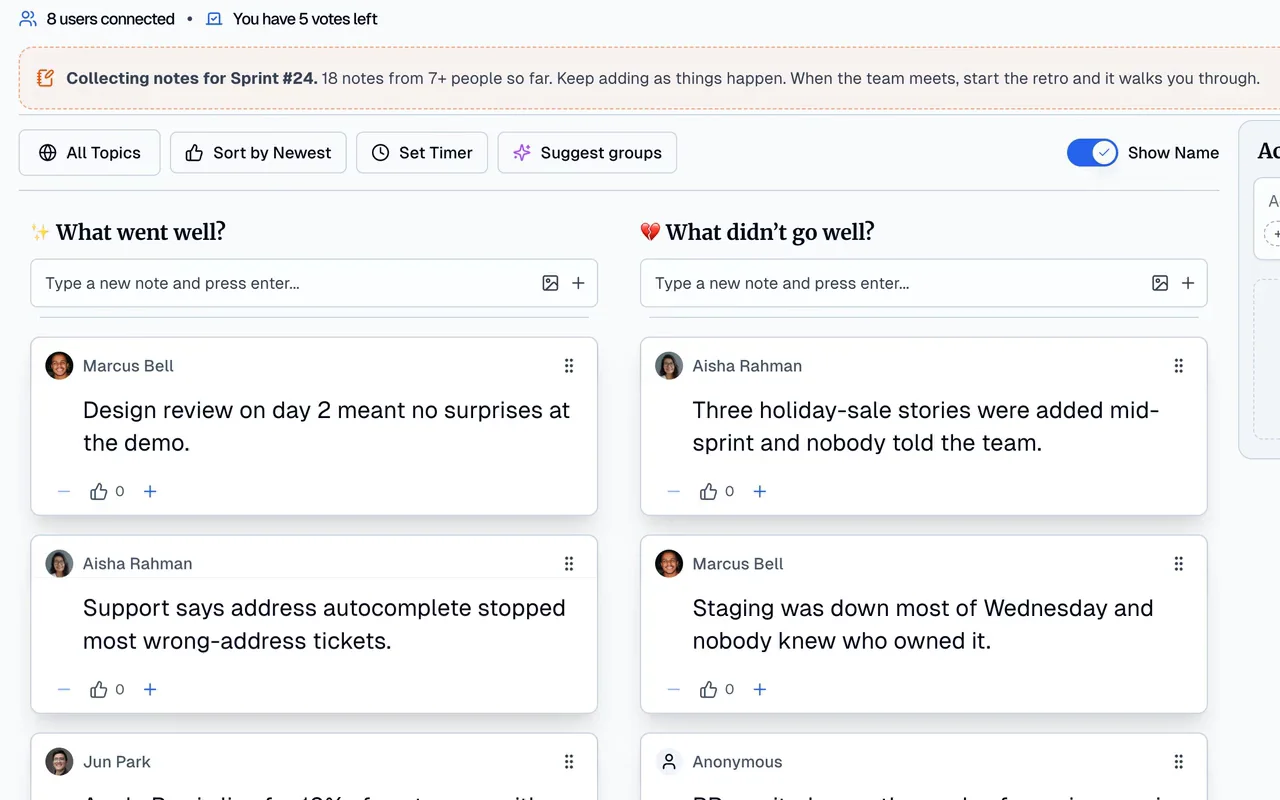
The trial is 14 days with no card, so it suits a retro you're about to run: invite the team and start collecting notes now. See pricing.
Related
Frequently asked questions
What is a project retrospective?
A facilitated review at the end of a project, or of a major phase, where everyone involved looks at what happened, what they learned and what to do differently next time. Norm Kerth's 2001 book Project Retrospectives introduced the term.
How is a project retrospective different from a sprint retrospective?
A sprint retro covers two weeks and feeds the next sprint with the same team. A project retro covers months, involves more people, relies on fading memories, and has no next sprint: its lessons have to reach a different team on a different project. So it needs more preparation and a plan for sharing what you learn.
When should you hold a project retrospective?
Within two to six weeks of the project ending, while details are fresh, which is what Intel's program settled on. On long projects, hold smaller ones at milestones too, so the current team can still use what it learns.
How long should a project retrospective be?
For a large project, two 2-hour sessions: one to understand what happened and one to write action plans. Intel found people flagged after two hours on a call. For a smaller project of a few months, one 90-minute session can be enough.
Who should facilitate a project retrospective?
Someone neutral who didn't run the project. Intel found that project managers facilitating their own reviews couldn't share their own view of the project, so it moved to a neutral, skilled facilitator. A Scrum Master or project lead from another team works well.
Is a project retrospective the same as a post-mortem?
They overlap. 'Post-mortem' usually suggests something went wrong, while a retrospective is held whether the project went well or badly, and looks at what to keep as well as what to change.
What's a good project retrospective template?
It depends on what you're closing. 4Ls suits a phase with more to come, Timeline suits a long stretch where memories blur, and Project Post-Mortem compares goals with results. See the project retrospective templates.
Run retros that actually lead to change
Your team adds notes during the sprint, CarrotIQ groups and summarizes them and suggests action items, and unfinished items carry into the next retro.
14-day free trial · No credit card