

On this page (7 sections)
This post first appeared on our old blog in 2019 (by Evan Resnick). We've rewritten and updated it for 2026.
We built Retro Rabbit in 2019 to fix three problems we kept seeing in sprint retrospectives. People forget most of what happened during the sprint. The quietest people hold back the most important issues. And nobody wants to log into yet another tool just to write one sentence. We started in Slack because that's where so many software teams already spent their day.
Seven years later, those three problems are still the reason the product exists. What changed is our understanding of the fix. It was never really "use Slack". It was capture the note when it happens, wherever you already are. Most teams now do that in the web app, and the product has grown around that idea: notes any time during the sprint, posting without your name, CarrotIQ to name groups and summarize, and action items that carry into the next retro.
This is how we got there, including what we got wrong.
The three problems we set out to fix
Evan Resnick, who wrote the original post, opened it with a scene most teams know: retro day arrives, and everyone scrambles to remember what they worked on two weeks ago.
Problem 1
Recency bias
People forget most of what happened during the sprint. The last few days crowd out the rest.
Problem 2
Discomfort speaking up
The quietest people hold back the most important issues.
Problem 3
Yet another login
Nobody wants to open another tool just to write one sentence.
1. Recency bias and imperfect memory
People are bad at remembering a sprint. You won't remember what you had for lunch on the first Monday, but you'll remember Thursday's outage in detail. That's recency bias: whatever happened last feels most important, and it crowds out everything else.
It gets worse in the meeting itself. When everyone is busy remembering, nobody is discussing. Our line from 2019 still holds: a retro should be retrospection, not remembrance. The effect multiplies for Scrum Masters who run retros for two or three teams and are expected to recall each one's sprint.
You can see it on the board. On retro day it fills up with the last three days: "Deploy pipeline flaky on Wednesday." "Thursday's incident." Nobody mentions that the first week lost a day and a half waiting on a staging database reset, because nobody remembers it.
2. Discomfort raising the important issues
Every person should have a voice in a retro. In practice some people talk more than others, and some won't raise a hard issue in front of the whole team, especially when it involves a senior colleague.
In 2019 our answer was anonymous notes. We describe it more carefully today (more on that below), but the principle hasn't changed. The person who notices a problem shouldn't need courage to write it down.
3. Yet another login
The original post had a line we still like: a tool is only as good as the person using it, but it's also only good if a person uses it. Plenty of tools let you add notes before the meeting. People still don't, because opening another website to type one sentence is just enough friction to make them think "I'll remember it later". They don't.
Why we started in Slack
In 2019, more and more teams were moving their conversations into Slack: discussions, build notifications, standups, and a channel per team. Many people had it on their phones. If adding a retro note took a few taps in an app you already opened dozens of times a day, the friction problem looked solved. And a team's channel looked like a natural place to collect a sprint's worth of notes.
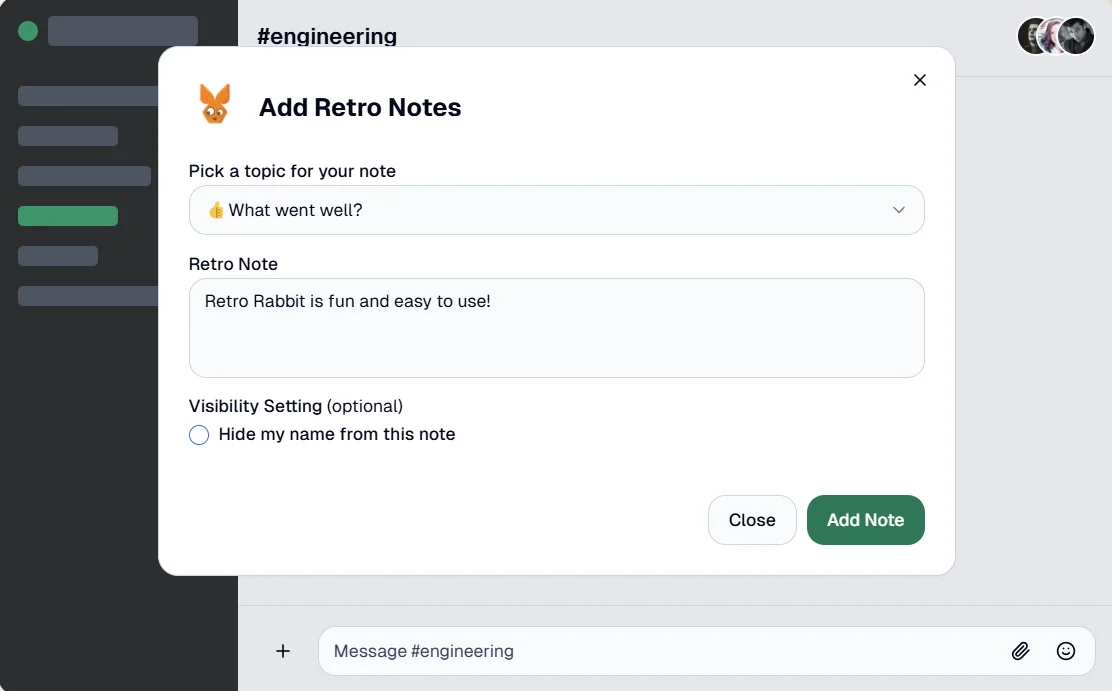
So Retro Rabbit started as a Slack-first retro app. You typed a note in Slack the moment something happened, and it was waiting for you on retro day.
What we learned: the insight wasn't Slack
Slack worked well for teams that lived in it. But over time it became clear that most teams were adding their notes in the web app, not in Slack. Today, most new teams use only the web app.
Looking back, it makes sense to us. Not every team runs on Slack. Even teams that do still hold the retro itself on a board, because people need to see each other's notes, drag related ones together, vote, and agree on actions. And a retro tool has to work for everyone on the team, including the people who rarely open Slack.
That changed how we describe the product. Retro Rabbit is for async and live sprint retrospectives that actually lead to change. Slack is one integration, and a useful one for teams that work there. It isn't the identity.
How the answer evolved
From one channel to the whole retro loop
-
2019
Slack-first
Type a note in Slack the moment something happens, and it waits for you on retro day.
-
Over time
Most teams move to the web app
Notes go on the web board or in Quick Notes. Slack becomes one integration.
-
Today
CarrotIQ
Names groups, summarizes the sprint and suggests action items.
-
Next retro
Action items carry over
Every action has an owner, and open ones show up at the next retro.
Here's how each original problem is handled today, plus one we didn't name in 2019.
| Problem | 2019 answer | 2026 answer |
|---|---|---|
| Recency bias | Add notes from Slack during the sprint | Add notes any time from the web board, Quick Notes or Slack |
| Discomfort speaking up | Anonymous notes | The Show Name switch |
| Yet another login | Stay inside Slack | A note box wherever you are, and sign-in with Google or Slack |
| Nothing changes afterward | Not addressed | CarrotIQ suggestions and action items that carry into the next retro |
Notes any time, from wherever you are
The board for the next retro opens as soon as the last one ends: clicking Start New Retro closes the current retro and opens the next board straight away. From day one of the sprint, anyone can add a note:
- on the board, in the "Type a new note and press enter..." box
- in the Quick Notes box in the Team Room, without opening the board
- with
/retro your notein Slack, if you've connected it
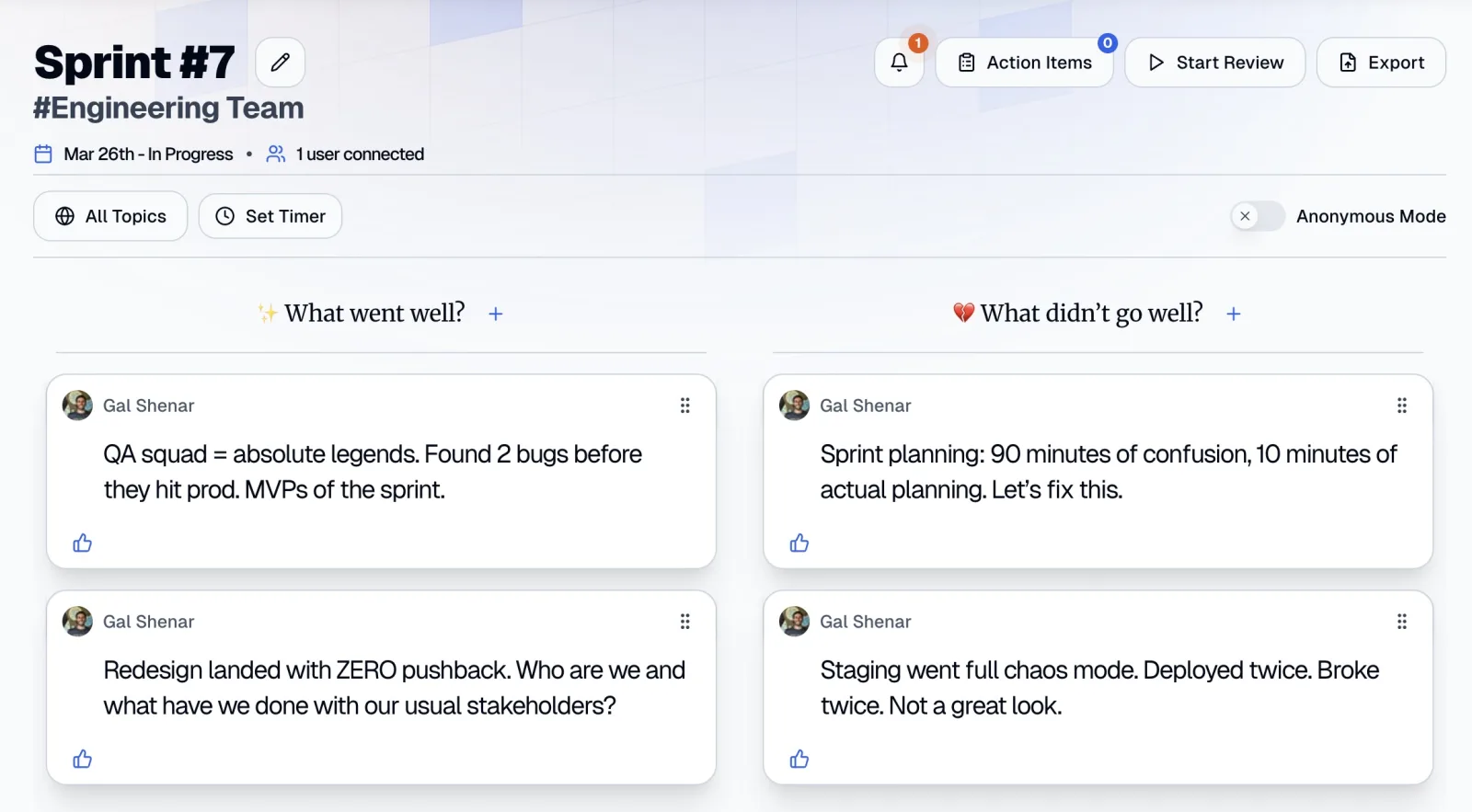
You can edit or delete your own notes later, which matters more than it sounds: a note dashed off on Tuesday can be clarified on Thursday. Slack-connected teams can also get a DM reminder to add notes, on the weekdays and at the time each person chooses.
The login problem turned out to be a friction problem. You can sign in with Google, Slack or email, and the Quick Notes box means adding a note doesn't require finding the right board. For more on running the whole retro this way, see how to run an async retrospective.
Posting without your name
The 2019 post called this anonymity. Today it's the Show Name switch: turn it off on the board, or in your profile, and your notes post without your name shown. We're careful with the wording now. The switch hides your name on the note; votes still show who voted. For most teams that's the right balance: the hard issue gets written down, and the discussion about it happens in the open.
CarrotIQ: help with the admin, not the thinking
The more notes a team adds during the sprint, the more there is to read on retro day. A busy sprint can leave 40 notes on the board, and someone has to make sense of them. That's the job of CarrotIQ, our AI, which is included in the Pro AI plan and during the free trial.
Group names
Drag related notes together, such as "staging was down Wednesday" and "couldn't test the checkout fix", and CarrotIQ names the group, for example "Staging Environment Reliability".
Sprint Summary
A short summary per column plus an overall one. Open it from the Team Room under All Retros, then Summary. It's handy for stakeholders who weren't in the room.
Suggested action items
CarrotIQ Suggest proposes an action from the notes, giving more weight to the most-voted ones and avoiding duplicates of actions you already have. You can edit it before you save it.
The team still decides what belongs together and what matters. CarrotIQ just keeps a 40-note board readable.
Action items that carry into the next retro
This is the problem we didn't name in 2019, and it may be the biggest one. A retro that produces good actions nobody finishes teaches the team that retros don't matter. Easy Agile, a tool vendor, surveyed 419 people for its State of Team Alignment 2026 report:
Follow-through in one 2026 survey
69%
of teams implement less than 60% of their retro actions before the next retro
So every action item in Retro Rabbit needs an owner: Assign To is required. At the next retro, the Action Items panel has a Previous Retro tab showing what you agreed last time, and an Old / Unresolved Items tab for older actions that are still open. Each person also sees the actions assigned to them under My Action Items on the dashboard.
Put the check date in the action itself: "Marcus documents who owns staging and posts it in the team channel by Friday." We wrote more about this in retrospective action items that actually get done.
What we'd tell a team starting today
Whatever tool you use, here's what we'd pass on, in five habits:
-
1
Open the board on day one
Don't wait for retro day. The first week of the sprint is the part everyone forgets.
-
2
Make a note take seconds
Use whatever is closest: a browser tab, a chat command, a sticky note on your monitor.
-
3
Make names optional
Some issues only get written down if the author doesn't have to defend them in front of everyone.
-
4
Agree on one to three actions, each with one owner
More than that and none get done.
-
5
Start every retro with the last retro's actions
Done, in progress, or drop it. If nothing got done, that's your first topic.
If you're new to retros, start with our sprint retrospective guide and a simple format like What Went Well. If the team already knows what needs to change, Start Stop Continue gets to actions faster. And for the problems teams raise most often, read the biggest problem agile teams have with retrospectives.
Try it in Retro Rabbit
Start a 14-day free trial with no card needed, and open your first board today so notes start on day one of the sprint. The trial includes CarrotIQ. Pricing is per team, not per user: see pricing.
Related
Frequently asked questions
What is a retro app?
A retro app is software for running team retrospectives. People add notes, group and vote on them, and agree on action items, either live in a meeting or asynchronously. Some retro apps, including Retro Rabbit, also let the team add notes during the sprint so the retro starts from what actually happened.
Do I need Slack to use Retro Rabbit?
No. You can add notes on the web board or from the Quick Notes box in your Team Room, run the retro live or async, and track action items without Slack. Connecting Slack adds the /retro command for notes, note reminders by DM, and a DM when an action item is assigned to you.
What is an async retrospective?
An async retrospective lets the team add notes, vote and propose actions in writing over several days instead of in one meeting. Many teams run a hybrid: notes go on the board during the sprint, and a short call at the end covers only the top-voted topics.
Can team members post retro notes without their name?
In Retro Rabbit, yes. Turn off the Show Name switch on the board, or the matching setting in your profile, and your notes post without your name shown. Votes are different: they show who voted.
What does CarrotIQ do in a retrospective?
CarrotIQ is Retro Rabbit's AI, included in the Pro AI plan and the 14-day trial. When you drag related notes together, it names the group. It also writes a Sprint Summary per column plus an overall one, and CarrotIQ Suggest proposes action items that weight the most-voted notes.
Run retros that actually lead to change
Your team adds notes during the sprint, CarrotIQ groups and summarizes them and suggests action items, and unfinished items carry into the next retro.
14-day free trial · No credit card